
Renting out
The Rent screen brings every step of giving a product to a customer onto one page. An experienced staff member does it in half a minute.
How to start
There are two ways:
- the big blue Rent out button on the Home screen;
- the Rent button at the bottom.
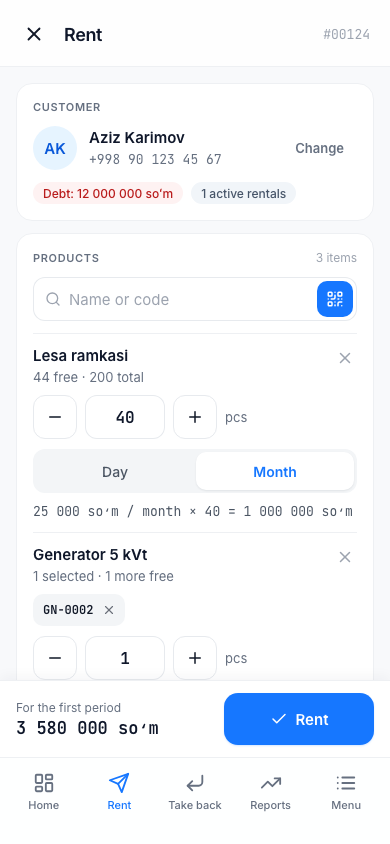
At the top you see the Rent title and the next rental number (for example, #00124).
1. Choose the customer
In the Customer section, type in the Phone number or name field. Matching customers appear — tap the one you need. After you choose, the customer card shows their debt and the number of active rentals; to choose another customer, tap Change.
If the customer is not there ("Customer not found — add one with the button on the right"):
- Tap the button on the right side of the search field (Add new customer). The New customer form opens.
- Enter the Full name (required) and the phone number.
- If needed, add these fields with the Passport and Note buttons.
There is no separate save button: the new customer is added when the rental is saved (when you tap Rent). If you change your mind — Cancel.
If the number already belongs to another customer, the app warns "This number belongs to {name}" — choose that customer with the Select button.
2. Add the products
In the Products section:
- type in the Name or code field and choose from the list. Next to each product there is a note "N free";
- or scan the label with the QR or barcode button.
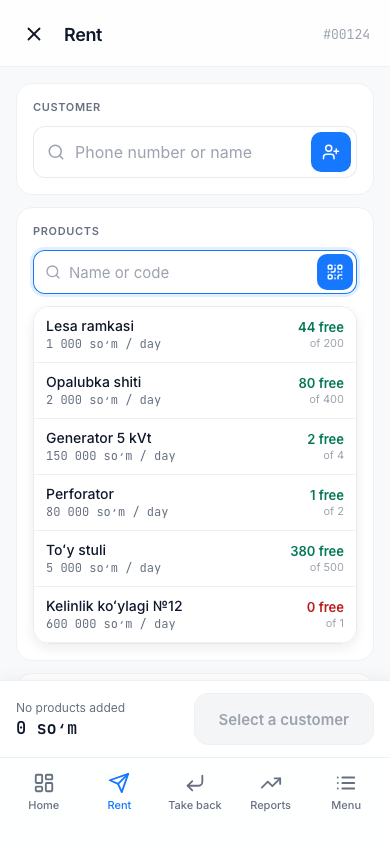
For a Per item product, you choose the item you need by its code (for example GN-0002). One code cannot be added twice: "{code} is already added". If an item is not available, the reason is shown: "Rented — {name}, #{no}", "In repair — for {days} days" or "Written off".
For a By quantity product, enter the count with the − and + buttons or by typing. If you enter more than the free count, you see "Only N free".
On each row, choose the tariff: Day, Week, Month, Year. Only the tariffs that have a price set on the product are shown. Under the row, the calculation appears, for example 25 000 UZS / month × 40 = 1 000 000 UZS. To remove a row, tap ✕.
3. Terms
In the Terms section:
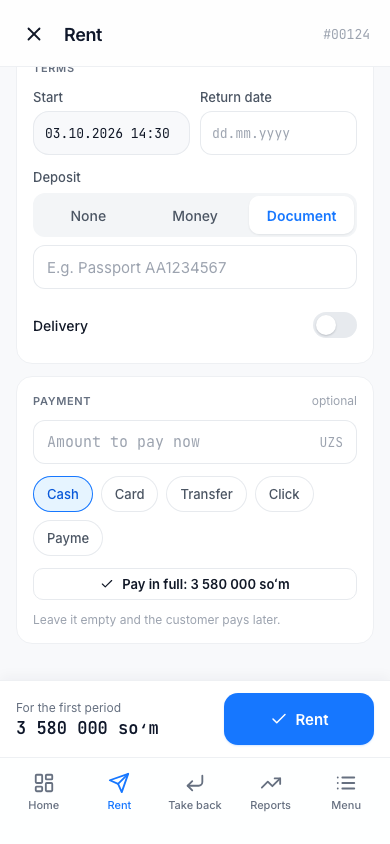
- Start — the date the rental starts (usually today);
- Return date — in the form
dd.mm.yyyy(for example,24.09.2026). You do not have to enter a date — if you leave it empty, it becomes "Not set". The date must not be before today; - Deposit — None, Money (enter the Amount) or Document (a short note about the document, for example "Passport AA1234567");
- Delivery — if you turn it on, the Delivery price appears. This is a one-time charge.
4. Payment
The Payment section is optional (it says optional). If the customer pays now, enter the Amount to pay now and choose the method: Cash, Card, Transfer, Click, Payme. The Pay in full button fills in the first period's amount for you.
"Leave it empty and the customer pays later." — it stays as debt.
Tip
Click and Payme are only labels. The app does not receive the money itself: you enter the amount yourself after you see that the customer paid through Click or Payme.
5. Rent
The bottom panel shows the rental's price calculated in advance: "For 1 month", or "For the first period" if several tariffs are mixed. If everything is correct, tap the Rent button.
If the button is not active, the reason is written in its place:
| Text | What to do |
|---|---|
| Select a customer | Choose a customer |
| Add a product | Add at least one product |
| Fix the error | Correct the row shown in red |
| Check the date | Correct the return date |
If you chose Money for the deposit, the Rent button is not active until you enter the amount.
Done
After the rental is saved, the Given out screen appears: the rental number, customer, products, return date, deposit and payment.
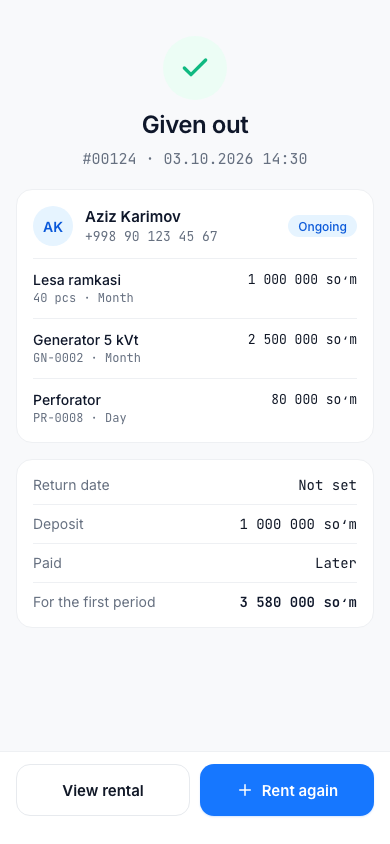
- View rental — the rental page: Payments and debt.
- Rent again — start the next rental.
How the rental fee is calculated
The rental fee is calculated every day and keeps growing until the product is returned. Days are counted by the calendar: from the start day to the return day (if the product is still with the customer — to today), at least 1 day.
For the chosen tariff, the rental fee is found like this: the number of full periods × the tariff price + the remaining days × the daily price. The money for the remaining days never goes above the price of one full period. The daily price is the product's Day price if it has one; if not, it is the tariff price divided by the period (week — 7 days, month — 30 days, year — 365 days).
Example. The Month tariff is 300 000 UZS, and there is no Day price. The product was taken for 35 days: 1 month (300 000) + 5 days × 10 000 = 350 000 UZS.
One more important thing: the price is fixed at the moment of renting out. If you change the product's price later, it does not affect existing rentals. After the return date passes, no penalty is added either — the rental fee simply keeps being calculated.